Reminders
Last updated: September 21, 2026
Reminders are automated notifications sent to users about important actions, due dates, and workspace milestones. Admins maintain centralized control over reminder settings across the organization, while individual users can adjust their personal notification preferences in Profile > Notification Settings.
These automated notifications alert users when a workspace or action requires attention, including:
Pending workspace invitations that haven't been accepted
Upcoming or overdue workspace due dates
Upcoming or overdue action due dates
Follow-up reminders sent at a defined frequency
Admins can define the timing and frequency of these notifications, supporting consistent and timely engagement throughout the workflow lifecycle.
Admin Controls
Organization Admins configure reminder rules globally from the Admin Portal. These settings apply consistently across all workspaces and actions.
Workspace Reminders
Admins can enable notifications for:
Workspace owners when an invitee hasn't joined within a specified number of days
Invitees if they haven't accepted an invitation within a specified number of days
Workspace owners as the workspace approaches its due date
Workspace owners on a recurring basis when the workspace is overdue
Action Reminders
Admins can enable notifications for:
Action assignees as an action approaches its due date
Action assignees on a recurring basis once an action becomes overdue
Action owners on a recurring basis when their assigned action is overdue
Each reminder type can be customized with:
A specific time to send the initial reminder
A repeat interval
A maximum number of reminder days
Reminder Delivery Time
Admins can set the exact time of day for reminders to be sent (e.g., 9:00 AM), creating predictable and reliable communication patterns.

Key Benefits
A centralized reminder system brings structure and clarity to workflows while giving organizations full control over notification governance. Benefits include:
Consistent behavior: The same reminder rules apply across all workspaces
Stronger governance: Standardized settings help maintain compliance across teams
Reliable delivery: Reminders are sent via email, push, and SMS to reach every user
User personalization: Users can select preferred channels without overriding core reminder rules
Setting Up Reminders in the Admin Portal
Go to the Admin Portal.
Select Reminders from the left-side menu.
Configure workspace reminders, action reminders, and delivery time.
Click Apply to save your changes.
User-Level Reminder Preferences
Admins enforce reminder rules across the organization, but internal users can tailor how notifications are delivered for their owned workspaces or assigned actions. These user preferences do not override admin configurations.
Users can adjust:
Communication Notifications: Receive all messages, only @mentions, or mute non-essential communication
Workspace Reminders: Toggle reminders on or off for owned workspaces or assigned actions
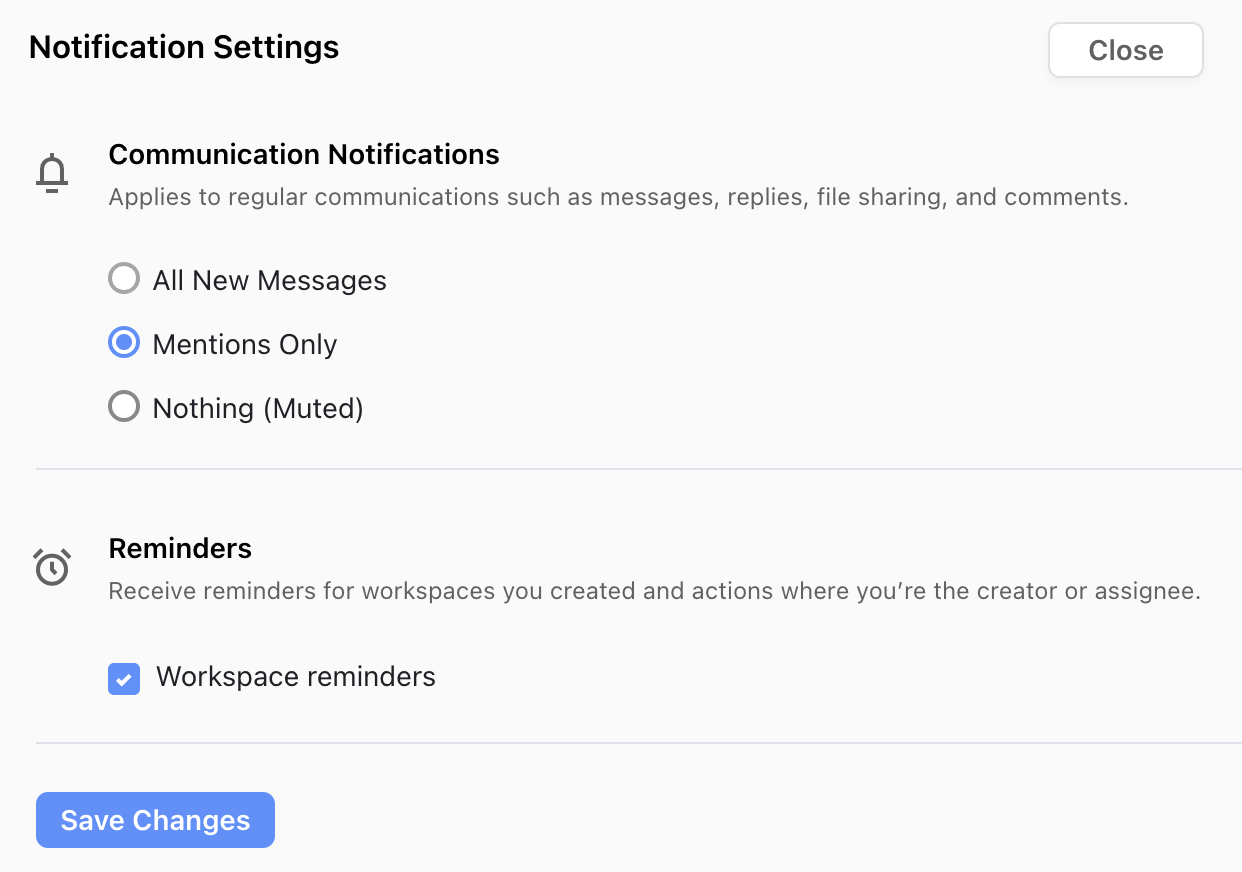
Essential alerts including workspace invitations, action assignments, due dates, and @mentions are always delivered and cannot be disabled.